
Chrome extension
Learn a language on the YouTube sentence you are watching.
Bilingual captions, word lookup, one-line looping, and timestamped notes stay on that line.
Chrome 扩展
看外语视频,不必在播放器和词典之间来回切。
双语、查词、单句循环和带时间戳的笔记,留在正在看的那一句上。
01
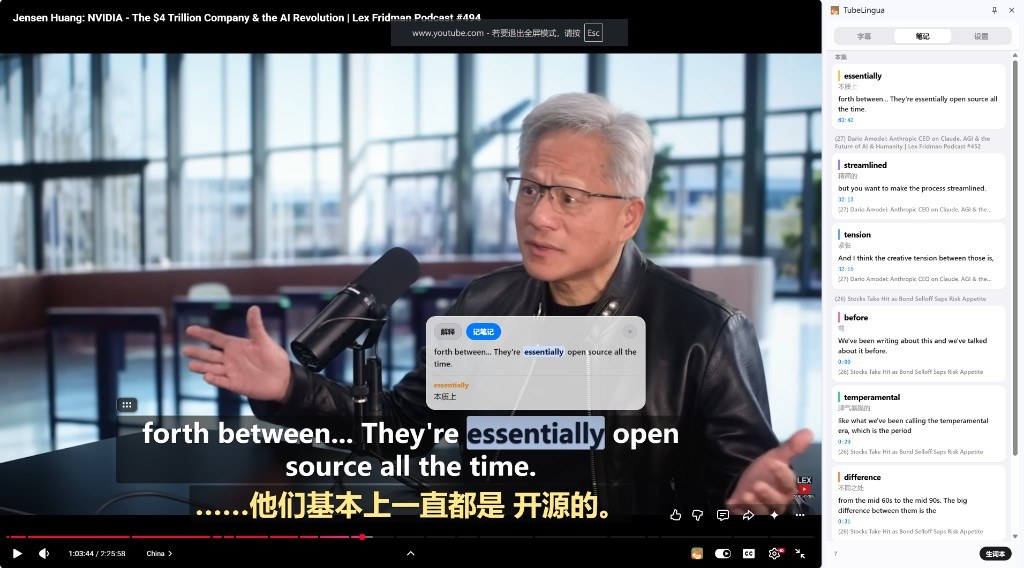
开了翻译,原文就从耳朵里溜走。
YouTube 要么只给外语,要么一键换成中文。TubeLingua 把原文和译文叠在同一帧上。听的是原声;看不懂的那一行,点时间戳就能跳回去。播放器里的狐狸开关双语:关上仍可读,打开才是彩色。
Turn on translation, and the original audio slips away.
YouTube gives you the foreign line, or it replaces it with your language. TubeLingua stacks both on the same frame. You keep listening to the original; if a line is too hard, jump back to that timestamp. The fox button on the player toggles color bilingual captions. Off still stays readable.

02
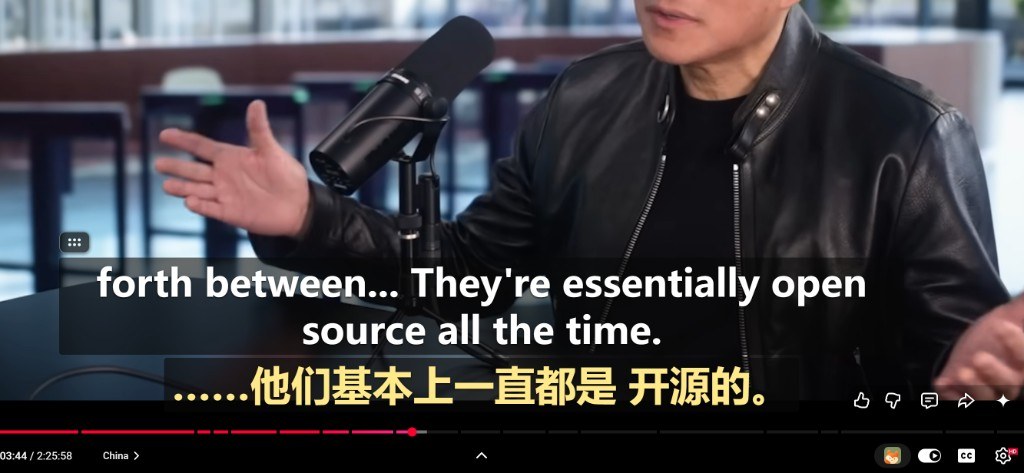
没听清的是这一句,就只重复这一句。
快退十秒往往会整段错过。点工具栏图标,或按 Alt + T,Chrome 侧栏打开字幕。上一句、下一句、单句循环都按字幕走。关掉面板后,页面上的狐狸按钮可以把你接回去。
- Alt+←上一句
- Alt+→下一句
- Alt+R单句循环
- Alt+T学习面板
If you missed this sentence, repeat only this sentence.
Skipping back ten seconds usually overshoots. Click the toolbar icon, or press Alt + T, to open captions in the Chrome side panel. Previous, next, and loop follow caption lines. After you close the panel, the fox button on the page brings you back.
- Alt+←Previous line
- Alt+→Next line
- Alt+RLoop line
- Alt+TStudy panel
03
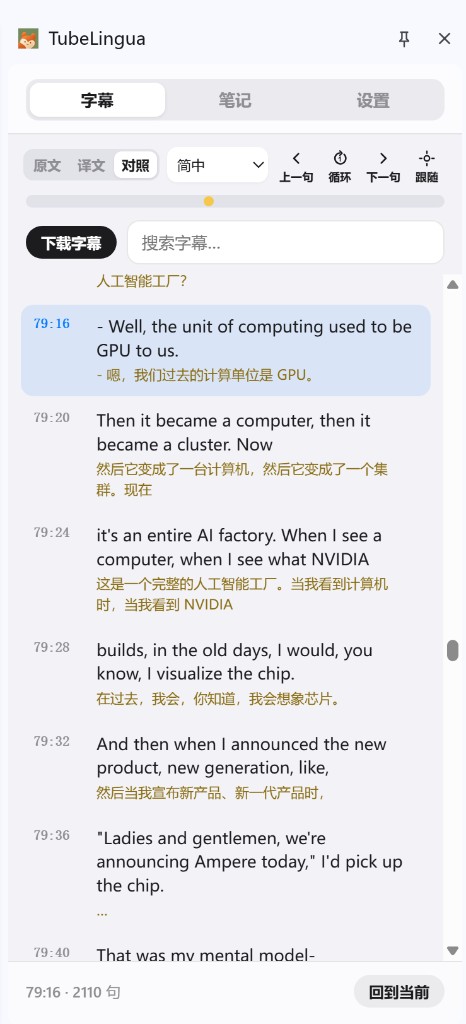
查一个词,不该变成另开一个标签页。
复制、切走、再回来,视频已经过了。鼠标停在或点在单词上,播放先停;词义贴着原句。点「解释」只补本句大意,词义还在,不会被整句翻译盖掉。学习面板里划选字幕,同样可以解释和记笔记。
Looking up a word should not mean opening another tab.
Copy, switch away, come back — the video has already moved on. Hover or click a word and playback pauses; the gloss stays on the original line. Explain adds the sentence meaning without replacing the word sense. You can also select captions in the study panel to explain or save a note.
04
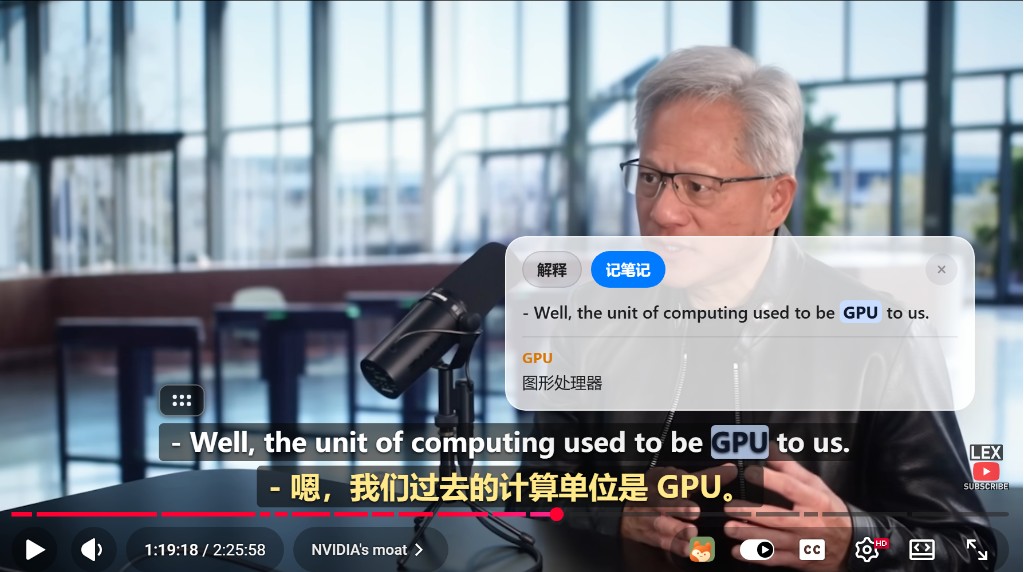
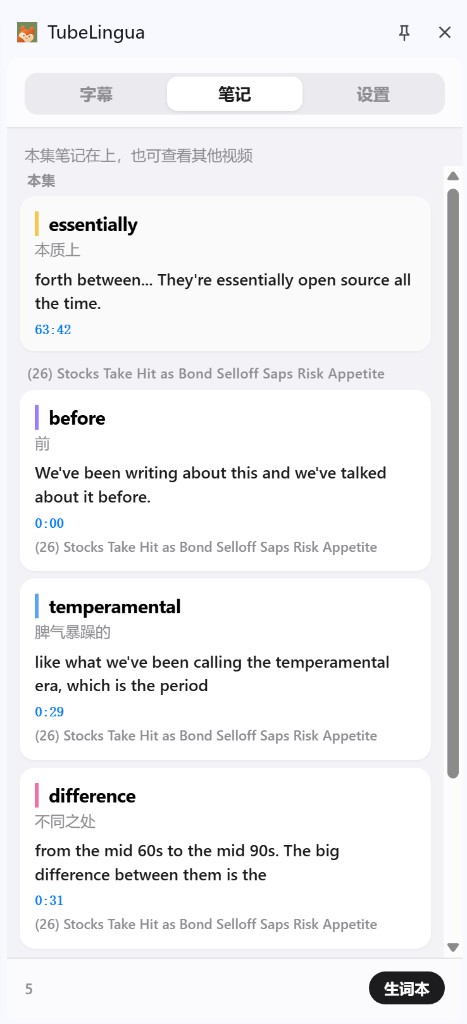
生词没有出处,过两天就只是一个单词。
记下的是这个词、这句原文、这秒画面。扩展里用 Google 登录后写入云端。换电脑,点一下就能跳回 YouTube 的那一秒。双语字幕和笔记需在扩展内登录后领取 7 天免费体验卡。本网站仍可自由阅读。
A saved word without its scene is just a word two days later.
Each note keeps the word, the original sentence, and the timestamp. After you sign in with Google inside the extension, notes sync to the cloud. On another computer, one click jumps back to that second on YouTube. Bilingual captions and notes need a 7-day free trial claimed in the extension. This website stays readable without signing in.
05
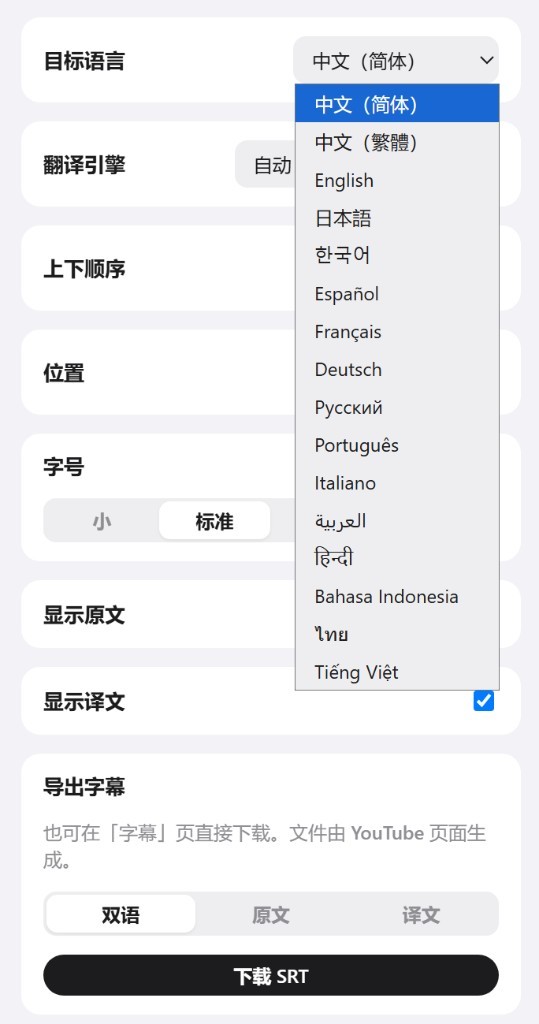
学的不一定是英语,字幕也不该只能看、不能带走。
目标语言换成日语、韩语、西语、法语都行,设置里还能再加。课后再看,下载双语、原文或译文 SRT。文件从正在看的 YouTube 页生成,不用另找下载站。
You might not be learning English, and captions should travel with you.
Change the target language to Japanese, Korean, Spanish, French, or add more in Settings. Export bilingual, original, or translation SRT from the YouTube page you are watching. No separate download site.
其余卡住的地方,也在这一屏解决。
翻译读不通、字幕挡画面、自动滚动抢走视线——都不必离开 YouTube。
The rest of the snags stay on this screen too.
Broken translations, captions covering a face, auto-scroll stealing your eye — none of that should send you off YouTube.
-
译文读不通,往往是一句话被切碎了。
YouTube 按时间片切字幕,整句会断成三段。默认优先整轨翻译;还是别扭就先拼回整句再译,或用你自己的 LLM / DeepL。
If the translation is nonsense, the sentence was probably sliced.
YouTube splits captions by time. Prefer the full-track translation; if it is still off, rejoin the sentence first, or use your own LLM / DeepL key.
-
字幕挡住人脸,把它拖开就好。
按住字幕框放到任意位置。原文在上还是译文在上,字体、字号、颜色按你看得下去的方式改。
If captions cover a face, drag them.
Hold the caption box and move it. Original above or translation above, plus type, size, and color, stay under your control.
-
翻找刚才那句时,别被自动滚动抢走。
播放时学习面板对准当前行。你一动手翻阅就停下跟随,要对回这一句时再点「回到当前」。
When you hunt for a line, auto-scroll should not steal it.
The study panel follows the current line while playing. The moment you scroll by hand, follow pauses. Tap “back to current” when you want it again.
-
不用把视频搬进另一个学习 App。
有字幕的 YouTube 打开即用。双语、查词、精听叠在你本来就在看的播放器上。
You should not have to move the video into another study app.
Open any captioned YouTube video. Bilingual captions, lookup, and looping sit on the player you are already watching.
卡住之前,先看这几句。
A few answers before you get stuck.
怎么安装?
打开 Chrome 网上应用店,点「添加至 Chrome」。装好后打开带字幕的 YouTube 即可。不必自己加载文件夹。
这个网站要登录吗?
不用。介绍页和隐私政策都公开。Google 登录只出现在装好的扩展里,用来同步笔记和开通双语。
没有字幕的视频能用吗?
不能。请先打开播放器的 CC。直播和纯音乐视频通常本来就没有字幕轨。
和 YouTube 自带翻译有什么不同?
自带翻译会把原文换掉。TubeLingua 让原文和译文同屏,并能停在这一句上查词、循环、记下带时间戳的笔记。
会收集我的观看记录吗?
不会。没有统计、没有广告。字幕只发往你选择的翻译服务;笔记在扩展内登录后写入 Cloudflare;付款走 Stripe。细节见隐私政策。
手机能用吗?
目前是 Chrome 桌面扩展,需要 Chrome 116 或更高。手机浏览器无法加载。
收费吗?
安装免费。在扩展里登录后可领取 7 天免费体验卡(限时优惠,之后 $5.99/月)。也可选首月 $1.99、季度 $14.99、年付 $49.99。若银行卡付款失败,可尝试微信 / 支付宝一次性购买。
How do I install it?
Open the Chrome Web Store and click Add to Chrome. Then open a captioned YouTube video. You do not need developer mode or a local folder.
Is this website public?
Yes. You can read this page and the privacy policy without a Google account. You do not log in here. Google sign-in exists only inside the installed Chrome extension, so notes can sync and bilingual captions can unlock.
Does it work without captions?
No. Turn on YouTube CC first. Livestreams and music videos often have no caption track.
How is this different from YouTube’s own translation?
YouTube translation replaces the original line. TubeLingua keeps original and translation on screen, and lets you look up a word, loop the line, and save a timestamped note.
Do you collect my watch history?
No. No analytics, no ads. Captions go only to the translation engine you chose. Notes are stored on Cloudflare after you sign in inside the extension. Payments go through Stripe. Details: Privacy Policy.
Does it work on a phone?
It is a desktop Chrome extension (Chrome 116 or later). Mobile browsers cannot load it.
Does it cost money?
Installing is free. After Google sign-in in the extension you can claim a 7-day free trial, then $5.99/month, or other plans. If card payment fails, you can try WeChat / Alipay one-time purchase.

获取 TubeLingua
在 Chrome 网上应用店免费安装。需要 Chrome 116 或更高。打开带字幕的 YouTube,在扩展里用 Google 登录领取 7 天免费体验卡后,双语才会叠在正在看的那一句上。
Get TubeLingua
Install free from the Chrome Web Store. Chrome 116 or later. Open a captioned YouTube video, sign in with Google inside the extension, and claim the 7-day free trial. Then bilingual captions sit on the line you are watching.
-
01
添加至 Chrome
在商店里点一次即可。不必打开开发者模式,也不必自己加载文件夹。
-
02
打开带字幕的视频
任意有 CC 的 YouTube。若仍无字幕,先手动点一次播放器的 CC。
-
03
打开学习面板并登录
点工具栏图标,或按 Alt + T。用 Google 登录后领取 7 天免费体验卡。
-
01
Add to Chrome
One click in the store. No developer mode, no unpacked folder.
-
02
Open a captioned video
Any YouTube video with CC. If captions do not appear, tap CC on the player once.
-
03
Open the study panel and sign in
Click the toolbar icon or press Alt + T. Sign in with Google in the extension and claim the 7-day trial.